Requirements for Installation and Use:
- Enki Application* + Enki Box or Enki Connect Box / Essentiel b Connect Box
* Requirements for the Enki application: Internet access and a phone with minimum operating system: Android 7 / iOS 15
Communication Protocol:
- Zigbee + Bluetooth*
* If the device is connected via Bluetooth, the functions available through the Enki application are limited. See the article Why can't my Bluetooth device be controlled via voice assistants (Alexa/Google Home) or through scenarios? for more details.
Available Countries:
- France**
- Spain
- Italy
- Poland
- Portugal
- Romania
**Essentiel b Connect Box only available in France
Status Feedback Available:
- Yes
Alexa Voice Control:
- Yes
Google Home Voice Control:
- Yes
Article Contents:
Technical Description
Product Functionality in the ENKI Application
Product View
How Does My Device Visually React in Different Situations?
How to Use My Device Without the Enki Application?
How to Reset My Device?
Technical Documents / User Manual
Technical Description:
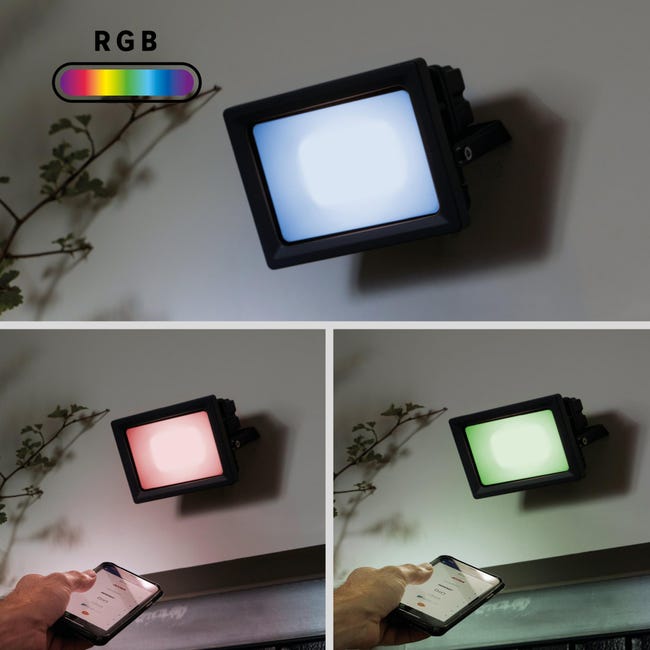
- Type: Connected color and white projector
- Requires ENKI box: Yes / ENKI Box V1 - ENKI Connect Box
- Status feedback: Yes
- Radio protocol: Zigbee (IEEE 802.15.4) / Bluetooth
- Radio frequency: 2405 - 2480 MHz
- Nominal voltage: 220-240V
- Nominal frequency: 50/60 Hz
- Nominal power: 20.5 W
- Energy consumption in ON mode: 21 kWh/1000 h
- Luminous power: 3000 lm
- Energy class: D
- Max. Radio power level 10 dBm
- Protection rating: IP65
- Usage: Indoor / Outdoor
- Shape: Rectangular
- Product color: Black
- Material: Aluminum
- Color temperature: From 2700K to 6500K
- Light color: RGB color change | Change from warm white to cool white
- Light intensity dimming: Yes
- Voice assistant compatible: Yes / Alexa and Google Home (Only in Zigbee mode)
- Operating temperature: -20 +40°C
- Storage temperature: -20 +60°C
- Device size: 75 mm x 108 mm x 7 mm
Product Functionality in the ENKI Application:
| Device Functionality | Properties | Scenario Integration | ||
| Actions | Triggers | Conditions | ||
| Turn On / Off | Product "ON" - "OFF" function | ✔ | ✔ | ✔ |
| Change Color / Hue / Saturation | Changes the color emitted by the bulb | ✔ | ✘ | ✘ |
| Change White Temperature |
White temperature: From 2200K to 6500K (Golden yellow / Light yellow / Warm white / Neutral white / Cool white / Cold white / Bright white / Brilliant white / Light blue / Cold blue) |
✔ | ✘ | ✘ |
| Change Brightness Level | Min: 0% / Max: 100% / Step: 1% | ✔ | ✘ | ✘ |
|
Timer Function: Turn off in / Turn on in |
Set a time during the day to turn the device "OFF" or "ON" | ✘ | ✘ | ✘ |
|
Timer Function: Cancel Timer |
"STOP" the timer set for "Turn off in" or "Turn on in" |
✘ | ✘ | ✘ |
| Scheduling |
Set a start time and device state Set an end time and device state (optional) Choose execution days |
✘ | ✘ | ✘ |
|
|
||
| Device in Bluetooth (Limited Functions) | Device in Zigbee on Enki box (Full Functions) | Settings |
| Control Page | ||
Product View:
How Does My Device Visually React in Different Situations?
|
Bulb in factory mode / reset, ready for pairing. Performs a white / red / green / blue cycle, then remains fixed white (Not associated with any device) |
Bulb detects a signal. Blinks once upon signal detection (Pairing signal from a device) |
Bulb paired. (Associated with a device) |
How to Use My Device Without the Enki Application?
You must have the Lexman lighting remote control (Gray) to be able to control your bulb without the Enki application.
How to Reset My Device?